If you want to win more games, increase your kills, improve your KD, and even earn tactical nukes in Black Ops 7, getting your controller settings right is essential. No matter what system or controller you’re using, these settings can help you play at a higher level. Here’s a complete guide to the best controller settings for Black Ops 7.
1. Sensitivity Settings
Black Ops 7 has faster movement and wall-jumping compared to previous titles. A faster sensitivity is recommended:
Sensitivity: 1.85 (both vertical and horizontal)
Tip: Don’t keep changing your sensitivity. Stick to 1.85 for a few days to get used to it. Constantly adjusting settings slows down your improvement.
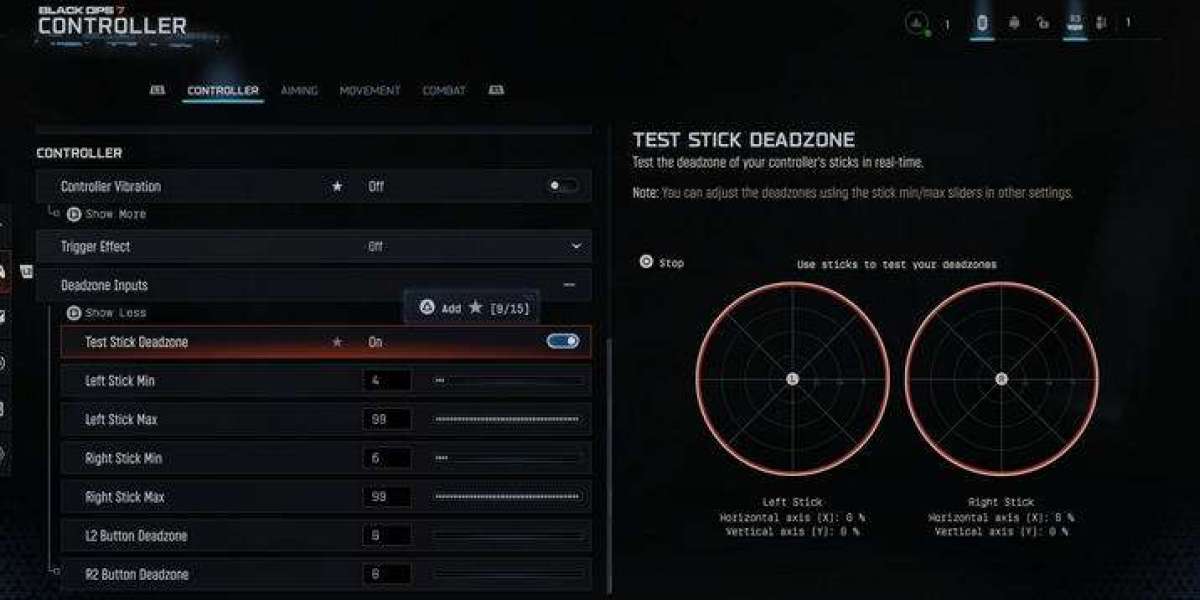
2. Controller Vibration
Vibration: Off
Vibration from shooting or explosions can throw off your aim during gunfights. Turning it off gives you more control and accuracy.
3. Dead Zones
Proper dead zones improve movement and aim:
Left Stick: Min 2 / Max 70
Right Stick: Min 2–4 (depending on controller drift) / Max 99
L2 & R2 Triggers: 0 / 0 for faster response
4. Aim Settings
ADS Sensitivity Multiplier: 70 / 70
ADS Sensitivity Transition: Instant
Curve Type: Linear
Slope Scale: 85
Target Aim Assist: On
These settings improve accuracy, tracking, and aim assist effectiveness across all game modes.
5. Movement Settings
Sprint Assist: On
Tactical Sprint Assist: Off
Corner Slicing: On
Slide & Dive Behavior: Slide only
Slide-canceling is crucial for maintaining momentum, and corner slicing allows you to take advantage of map positions efficiently.
6. Graphics Settings
Refresh Rate: 120 Hz (if your display supports it)
Gamma / Brightness: 50
World, Weapon, Depth of Field: Off (for cleaner visuals)
Fidelity Cast Strength: 80
Texture Streaming: Optimized, Cache Size Large, Download Limit Off – ensures you always have the best textures for smooth gameplay.
7. Field of View & Camera
FOV: 115
ADS FOV: Unaffected
Weapon FOV: Wide
First/Third Person Camera Movement: 50%
These settings reduce visual recoil, smooth movement, and improve weapon handling.
8. Audio Settings
Gameplay Music / Cinematic Music: 0
Audio Mix: Sucker Punch (recommended for hearing footsteps clearly)
Headset Recommendation: High-quality headphones like Astro A40
Hit Marker Preset: Classic (Black Ops 4 style)
Proper audio settings help you locate enemies faster and react more accurately in combat.
9. Interface & HUD
Safe Area: Small (brings HUD closer to the center for easier reading)
Mini Map Rotation: On
Compass: Off
Crosshair Lines / Spread / Dot: On, static, scale larger, opacity 100%
Crosshair Color: Green (19FF0000) – visible in bright and dark areas
Smaller HUD and clear crosshairs improve your aiming and situational awareness.
By following these controller settings, you’ll be better prepared to dominate in Black Ops 7. From higher kill games to earning tactical nukes, these adjustments cover sensitivity, movement, graphics, audio, and HUD optimizations.
Pro Tip: Consistency is key. Stick to these settings, practice, and you’ll see improvement quickly.
That is all you need to know! For more info, please feel free to browse U4GM! Also, cheap bo7 bot lobby for sale here that can help you unlock edge in the game!